Published on
A single web server is simple until it needs an update or goes down. With two web servers and a load balancer in front of them, the load is shared, and if one goes down, the other takes over. I can also take one out on purpose, for example to install the next big update and check it myself before visitors land on it again. They don't notice; the other server carries everything in the meantime.
This post describes how I set that up with HAProxy: who handles TLS, how visitors are
spread across the servers and tied to one of them. To put it to the test, I then walk
through an update. The example has two web servers, web1 and web2, and web1 is the
one getting the update. Everything refers to HAProxy 3.0.
The setup
This is a test environment, not a recommendation for production. HAProxy and the two web servers run as three containers on one machine, so the whole thing starts in a minute and can be thrown away again:
services:
    haproxy:
        image: haproxy:3.0-alpine
        ports:
            - '80:80'
            - '443:443'
        volumes:
            - ./haproxy.cfg:/usr/local/etc/haproxy/haproxy.cfg:ro
            - ./ssl:/etc/haproxy/ssl:ro

    web1:
        image: nginx:alpine

    web2:
        image: nginx:alpine
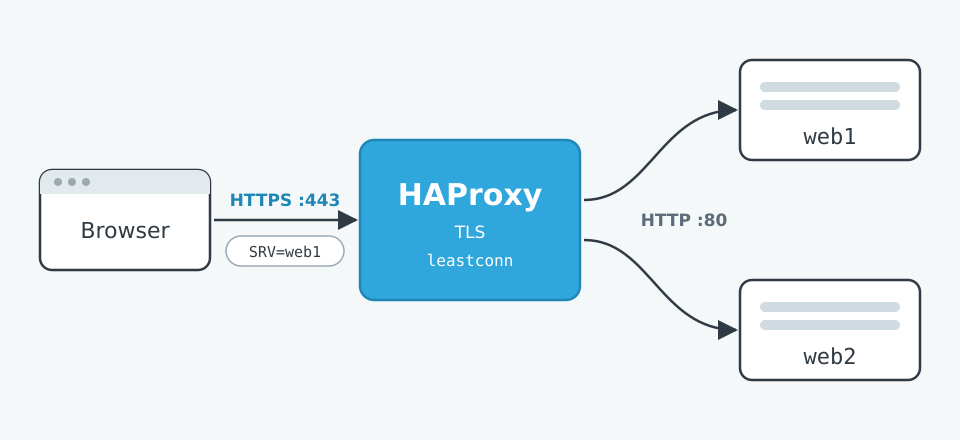
Only HAProxy has ports to the outside. The two web servers can only be reached inside the
Compose network, under their service names: web1 and web2. ./ssl holds the
certificate and its key in one file; a self-signed one is enough for the test.
This is not fail-safe. If the machine goes down, both web servers are gone, and HAProxy with them. In production the web servers sit on separate machines with fixed addresses. That changes nothing in the procedure further down; the commands are the same.
Then the haproxy.cfg:
global
    # Interface for commands at runtime. Listens only inside the container itself,
    # nobody gets at it from outside.
    stats socket [email protected]:9999 level admin

defaults
    mode http
    # If the server named in the cookie cannot be reached, the request goes to another one.
    option redispatch
    retries 2
    timeout connect 3s
    timeout client 1m
    timeout server 1m
    # Applies to every server line further down:
    #   init-addr last,libc,none  HAProxy starts even when a web server is not running yet
    #                             and its name therefore cannot be resolved
    #   resolvers docker          look the names up later through Docker's DNS
    #   check                     check regularly whether the server answers
    default-server init-addr last,libc,none resolvers docker check

# The DNS Docker provides in every container. It knows the services from
# docker-compose.yml by their names. If a container restarts and gets a
# different address, HAProxy notices within 5 seconds at the latest.
resolvers docker
    nameserver dns 127.0.0.11:53
    hold valid 5s

# Port 80 only accepts connections to redirect them to https.
frontend http
    bind :80
    http-request redirect scheme https code 301

# TLS ends here. The certificate lives only on HAProxy.
frontend https
    bind :443 ssl crt /etc/haproxy/ssl/example.pem alpn h2,http/1.1
    # pass the visitor's address on to the web server as X-Forwarded-For
    option forwardfor
    # tell the web server that the visitor came in over https
    http-request set-header X-Forwarded-Proto https
    default_backend webservers

backend webservers
    # New visitors go to the server with the fewest open connections.
    balance leastconn
    # The cookie SRV sticks the visitor to their server. It expires after 30 minutes
    # without a request, after 12 hours at the latest.
    cookie SRV insert indirect nocache maxidle 30m maxlife 12h
    # Back door for testing: the cookie SRVTEST=<server name> leads to exactly that server,
    # even when it is locked.
    force-persist if { req.cook(SRVTEST) -m found }
    use-server %[req.cook(SRVTEST)] if { req.cook(SRVTEST) -m found }
    # server <name> <service from docker-compose.yml>:<port> cookie <value in the cookie SRV>
    # The web servers only listen on port 80, without TLS.
    server web1 web1:80 cookie web1
    server web2 web2:80 cookie web2
Three parts of it carry the update procedure:
stats socketopens the interface through which you give HAProxy commands at runtime.cookie SRV insertsticks every visitor to their server. On the first request HAProxy sets a cookieSRV=web1orSRV=web2, and from then on the visitor always lands there again. This is not required when the sessions are in a shared place (see below). I do it so that all requests from one visitor end up in the log of the same server.force-persistanduse-serverare the back door for myself. More on that further down.
The lines default-server ... init-addr ... resolvers docker and the resolvers docker
block are concessions to the test environment. Containers only get their address when they
start, and after a restart it may be a different one. Without init-addr ... none, HAProxy
aborts at startup as soon as one of the web servers is not running. Without resolvers, it
keeps the address from startup and sends into the void after the web server's container
restarts. With both, HAProxy starts even without web1 and finds it again on its own when
it comes back.
If the web servers sit on machines of their own with a fixed address, all of that goes
away. The line is then simply server web1 10.0.0.11:80 check cookie web1.
One requirement lies outside HAProxy: the visitors' sessions have to be in one shared place, for example in Redis or in the database. If they are on the disk of the individual web server, everyone you move to the other server is logged out.
TLS ends at HAProxy
In the setup above, only HAProxy speaks HTTPS. The certificate is in one place, in the
frontend's bind line. The web servers behind it listen on port 80 and know nothing about
TLS:
server web1 web1:80 cookie web1
That saves work on every update. A web server without a certificate, without an SSL module and without a 443 virtual host has less that can be different after an update. When the certificate expires, I swap one file on HAProxy rather than one per server.
The catch: the application now only sees HTTP. If it asks the web server whether the
request was encrypted, the answer is always no. That is why HAProxy sets
http-request set-header X-Forwarded-Proto https. The application has to evaluate this
header in two places:
- Redirect to HTTPS. If the web server itself redirects everything from HTTP to HTTPS,
you get a loop, because every request reaches it as HTTP. Here the redirect is done by the
httpfrontend in HAProxy. If it stays in the web server as well, it may only apply whenX-Forwarded-Proto: httpsis missing. - Cookies and links. Whether the session cookie gets the
secureattribute and whether generated links start withhttps://depends on the same header.
The traffic between HAProxy and the web server is therefore unencrypted. In a network of its
own that nobody else is on, that is common. If the route runs over lines that belong to
somebody else, TLS belongs there too (server web1 web1:443 ssl verify required ca-file ...).
Passing on the visitor's IP address
With a proxy in front, every request reaches the web server from HAProxy. Logs, blocks and
limits by IP then only see HAProxy's address. That is why option forwardfor in the
frontend writes the visitor's address into the X-Forwarded-For header.
The application does not have to read the header itself. With Apache, mod_remoteip takes
care of it:
RemoteIPHeader X-Forwarded-For
# Only requests from this network may set the address through the header.
# This is the network HAProxy connects from.
RemoteIPInternalProxy 172.16.0.0/12
After that, $_SERVER['REMOTE_ADDR'] holds the visitor's address again, and the code behind
it stays as it was. For the access log, LogFormat needs %a instead of %h, otherwise
Apache keeps logging HAProxy. In nginx the counterparts are set_real_ip_from and
real_ip_header.
The web server may only trust this header when the request comes from HAProxy. If the web servers can also be reached directly, anyone can otherwise write someone else's address into the header. The simplest way is for them to accept connections on port 80 from HAProxy only.
Sending commands to HAProxy
There is no separate program for it. The "CLI" is the socket from the global section, and
you send text into it. Because it only listens inside the container, I go in there first.
nc already comes with the haproxy:3.0-alpine image:
docker compose exec haproxy sh
# scur = connections open right now, status = state of the server
echo "show stat" | nc 127.0.0.1 9999 | cut -d, -f1,2,5,18,19
# Lists all commands:
echo "help" | nc 127.0.0.1 9999
# pxname,svname,scur,status,weight
https,FRONTEND,1,OPEN,
webservers,web1,0,UP,1
webservers,web2,0,UP,1
webservers,BACKEND,0,UP,2
All further commands in this post run in this shell.
Here the socket only listens on 127.0.0.1, and it should stay that way. Whoever reaches it
can switch servers off. A Unix socket (stats socket /run/haproxy/admin.sock) addressed with
socat is common too. I did not use it in this setup.
An update without downtime
The setup is in place. Now web1 is to get an update while web2 carries all visitors.
Step 1: Emptying the server
There are two states for this, and the difference matters.
# drain: no new visitors. Whoever already has the cookie SRV=web1 stays on web1.
echo "set server webservers/web1 state drain" | nc 127.0.0.1 9999
That is exactly what tripped me up. I had set the server to drain, reloaded the page and
was still on web1. Not a bug; my browser had the cookie.
# maint: nobody any more, not even with a cookie. Because of option redispatch these
# visitors land on web2 and get a new cookie there.
echo "set server webservers/web1 state maint" | nc 127.0.0.1 9999
| State | New visitors | Visitors with a cookie for this server |
|---|---|---|
ready |
yes | yes |
drain |
no | yes |
maint |
no | no, they move to the other one |
For an update I go straight to maint. drain is worth it when the sessions are tied to
the individual server and you want to let people there finish in peace. With shared
sessions there is no reason for it.
maint does not cut off requests that are in progress. They run to the end; only new ones
stop arriving. Before the update I therefore wait until scur for web1 is at 0:
webservers,web1,0,MAINT,1
webservers,web2,3,UP,1
For both commands HAProxy answers with nothing but an empty line. No output means it worked.
Step 2: The update
Now web1 is mine. Install the package, restart the service, whatever is due. Nothing
comes in from outside any more.
Step 3: Testing it myself before everyone comes back
The server is updated, but I do not know yet whether it works. If I set it to ready now,
the visitors find out for me. I want to get on it myself first, as the only one.
That is what the two lines in the backend are for:
# Applies even when the server is on maint right now.
force-persist if { req.cook(SRVTEST) -m found }
# Sends the request to the server whose name is in the cookie SRVTEST.
use-server %[req.cook(SRVTEST)] if { req.cook(SRVTEST) -m found }
Together that makes a cookie with which I pick the server, whatever state it is in.
In the browser's console:
document.cookie = 'SRVTEST=web1; path=/; secure';
location.reload();
This is how it behaves while web1 is on maint:
| Cookie | Lands on |
|---|---|
| none | web2 |
SRV=web1 |
web2 |
SRVTEST=web1 |
web1 |
SRV=web2 and SRVTEST=web1 |
web1 |
SRVTEST=doesnotexist |
web2 |
The cookie's value is the server name from the configuration. That is why a third server
needs no rule of its own; SRVTEST=web3 then works by itself. A name that does not exist is
ignored, and the request is spread as usual.
When I am done, I delete the cookie again:
document.cookie = 'SRVTEST=; path=/; max-age=0';
location.reload();
On a server that is on the internet, a cookie called SRVTEST is too easy to guess. Whoever
sets it lands on a server in the middle of an update. Either the cookie gets a name nobody
guesses, or the rule additionally applies only to internal addresses, for example with
{ src 10.0.0.0/8 } as a second condition.
Step 4: Switching it back on
echo "set server webservers/web1 state ready" | nc 127.0.0.1 9999
Less happens after that than you might think. By now all visitors have a cookie for web2
and stay there. Only new visitors and those whose cookie has expired land on web1. So the
server fills up gradually on its own.
And if the update is broken after all:
echo "set server webservers/web1 state maint" | nc 127.0.0.1 9999
With that, everyone is back on web2 immediately. It is the same command as in step 1, and
that is exactly what makes the procedure so pleasant: there is only one switch, and it works
in both directions.
Why leastconn?
balance decides how HAProxy places a visitor without a cookie. Here it says leastconn:
the request goes to the server that has the fewest open connections at that moment.
The reason is the moment a server comes back. It has zero connections, the other one carries
everything. With leastconn, the empty server gets the new connections until both have
roughly the same amount to do again. roundrobin would stubbornly alternate. The server
that was alone the whole time would stay full, and the returning one would only get half of
what newly arrives.
Two limitations:
leastconncounts connections, not visitors. Whoever has a cookie stays where they are. The filling up only concerns those who are placed anew.- A server that has only just started gets the rush all at once. Against that there is
slowstart 30son theserverline, which ramps the load up over the given time.
The price: with leastconn I cannot reliably say "this server gets 10 %". Weights can be
set (set server webservers/web1 weight 10), but they only take effect when many
connections are open at the same time. Without load, leastconn simply alternated for me
despite different weights. Whoever wants to try an update on a small share of visitors first
needs roundrobin, which keeps to the weights exactly.
I do not miss it. I can test beforehand with the cookie, and after switching the server back on, the visitors only arrive gradually anyway.
What else there is
Briefly, what can stand in place of leastconn:
| Setting | How requests are spread | For |
|---|---|---|
roundrobin |
In turn, by weight. Weights can be changed at runtime | Short, similar requests, a split in percent |
static-rr |
Like roundrobin, but weights only apply after a restart |
Rarely needed, slightly less computation |
leastconn |
To the server with the fewest open connections | Long requests, or requests of very different length |
first |
Always the first server until its maxconn is full, then the next one |
Being able to switch servers off under low load |
source |
By the visitor's IP, the same IP lands on the same server | Tying visitors to a server without a cookie |
uri |
By the requested address, the same address always on the same server | Caches behind the load balancer |
hdr(name) |
By the value of a header | Spreading by customer or tenant |
random |
At random, by weight | Many servers that come and go often |
As long as a cookie holds the visitors in place, the setting only decides on the first request anyway.
What to watch out for
A restart forgets everything. What was set through the socket is not in the
configuration. After HAProxy restarts, a server on maint is ready again. That happened to
me when I changed a line in the configuration during the test. Whoever does that in the
middle of an update switches the half-finished server on for everyone. HAProxy can save the
states to a file and load them again at startup (server-state-file).
drain is not empty. Whoever only sets drain and then installs the update hits
everyone who still has a cookie for this server.
Your own cookie leads you astray. As long as SRVTEST is set, I always see the one
server, whatever I switch on the socket. So delete it after the test, otherwise you spend
hours checking something other than what the visitors see.
The server name is not the host name. The commands say webservers/web1, that is the
backend and the name from the server line. Not the address and not the machine's name.
What else comes with two servers
The load balancer is the smaller part. As soon as the same application runs twice, a few questions come up that HAProxy does not answer:
- Cron jobs. If the same job runs on both servers, it runs twice. If it runs on only one, it stands still while that server is being updated.
- Database migrations. During the update, old and new code work against the same database. A schema change has to work with both versions.
- Files. An upload lands on one server, the next request on the other. Uploads belong on shared storage, just like the sessions.
- Headroom. During the update, one server carries everything. If it is only enough for half, the update itself causes the outage.
- HAProxy itself. It is now the one place everything depends on. The usual answer is two of them with a shared address that moves when one fails.
The procedure in four lines
set server webservers/web1 state maint, wait untilscuris at 0.- Install the update on
web1. - Check it yourself with
SRVTEST=web1, then delete the cookie again. set server webservers/web1 state ready. If something goes wrong, back to step 1.