Published on
I wanted the weight directly in the browser, without an extra program and without a local service in between. The scale is a GRAM Xtrem F1-30. It's connected to the computer over USB, and the browser talks to it through the Web Serial API.
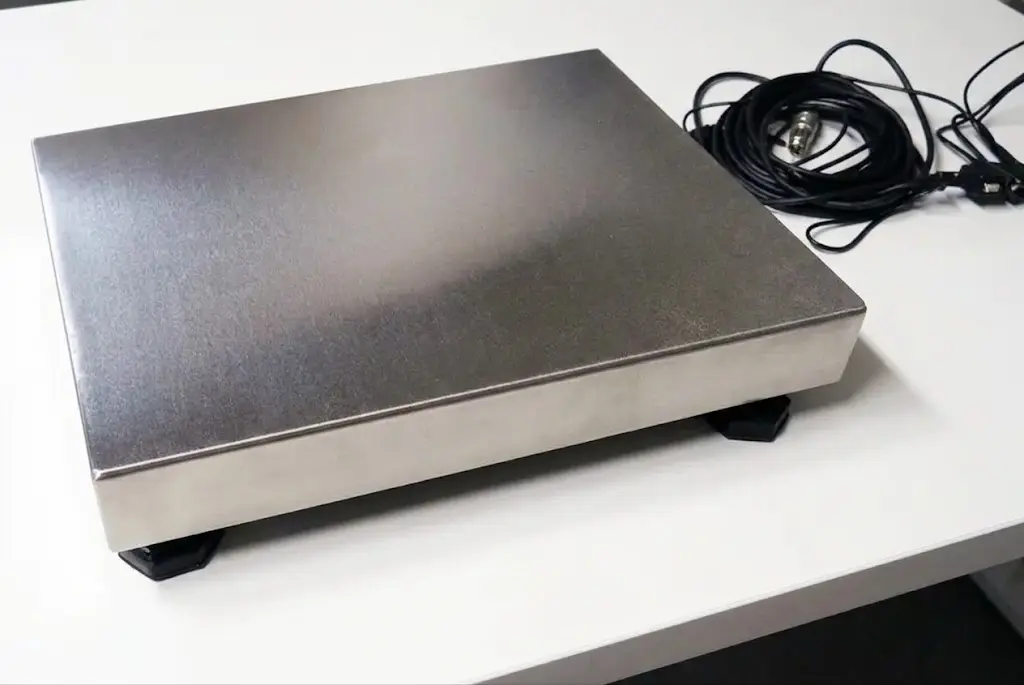
Before it worked, I got stuck at four points that I couldn't find in any manual. They're covered below.
The hardware
The cable
The Xtrem has a normal RS-232 interface. Today's PCs don't have a COM port any more, so you need a USB-to-serial adapter. Here's what to look for when buying one:
| Property | Why |
|---|---|
| Real RS-232 levels (±12 V), not TTL at 3.3 V or 5 V | The scale speaks classic RS-232. The cheap "USB-TTL" boards with a pin header don't fit. |
| DB9 connector (male) on the adapter | Fits the DB9 socket on the scale's cable. |
FTDI chip (vendor ID 0403) |
Runs stably, drivers exist for everything. Prolific clones tend to cause trouble. |
| USB-A or USB-C | Doesn't matter, as long as it's FTDI and RS-232. |
In the browser the adapter shows up with vendor ID 0403, and an FT232R also with
product ID 6001. That's how the page recognises it later, without anyone having to
select anything.
Drivers
On Windows 11 plugging it in is enough, and Device Manager shows a "USB Serial Port (COM3)" right away. On Windows 10 my machine only recognised the adapter after I had installed the FTDI VCP driver (Virtual COM Port).
The power connection
The scale itself has no socket for the power supply. That was the first point where I got stuck. The Xtrem has a combined cable that carries both data and power. The power socket sits on the DB9 connector at the other end, where the USB-to-serial adapter plugs in as well. So the power supply (7.5 V, 1 A) goes on the cable connector and not on the scale.
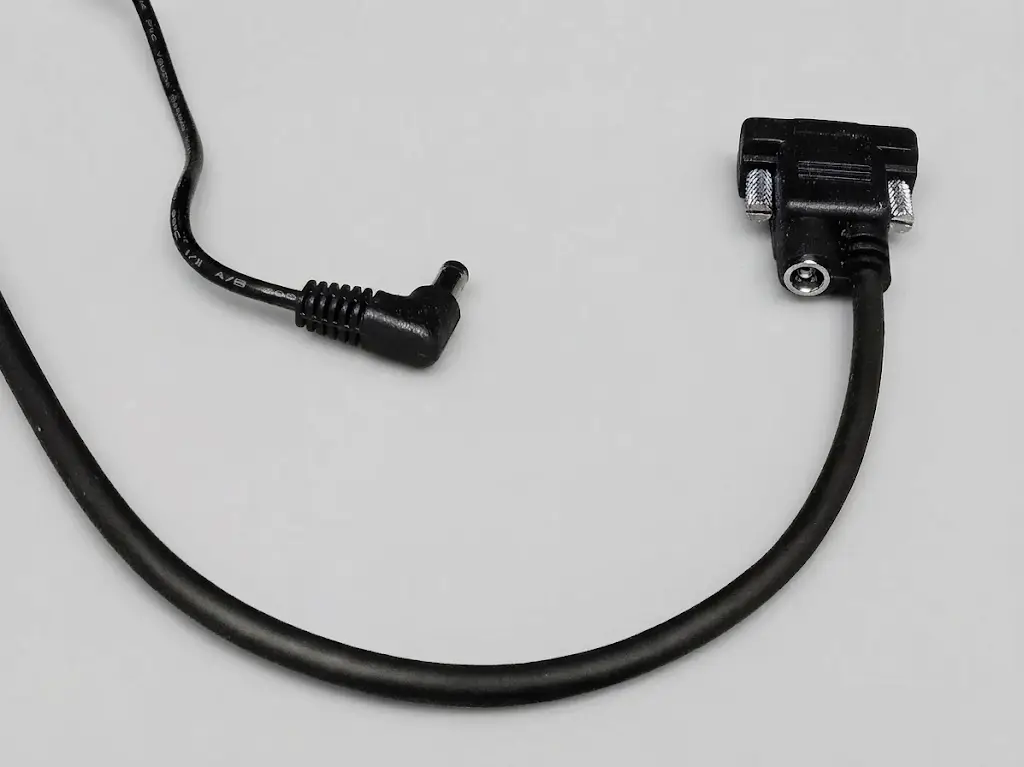
When the scale is running, the green LED is lit. It blinks while data goes over the interface. That's the quickest way to see whether anything is happening at all.
Setting up the scale
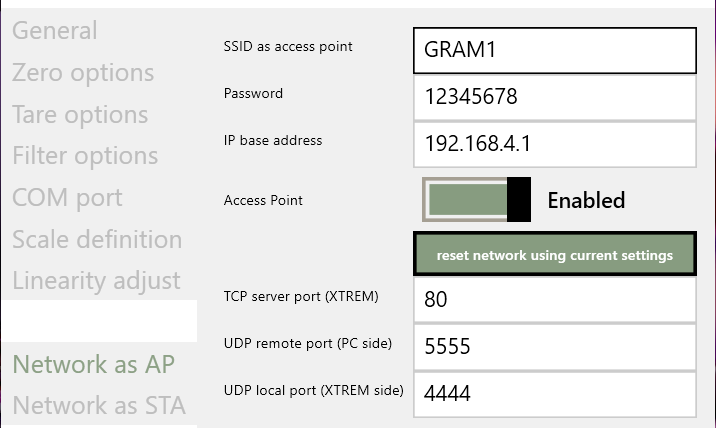
With the Wi-Fi module, the Xtrem opens its own hotspot out of the box. The factory settings are in the manufacturer's communication protocol:
| Setting | Default value |
|---|---|
| SSID | GRAM_01 |
| Password | 12345678 |
| Scale IP | 192.168.4.1 |
| TCP server port | 6666 |
| UDP send / receive | 4444 / 5555 |
You configure the scale with the Windows program GRAM-PC-XTREM. Connect to the scale's Wi-Fi and start the program.
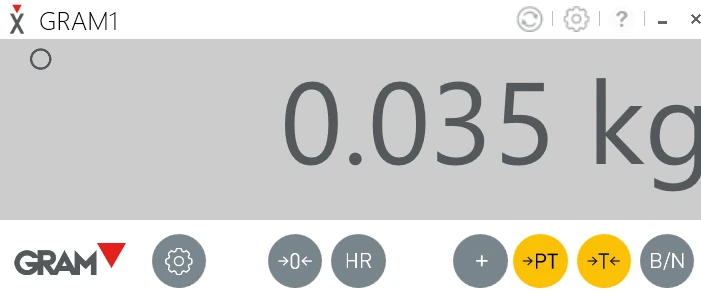
The settings are locked with a PIN. From the factory it's 1009, the same kind of
default as the Wi-Fi password above.
Important: the PC program occupies the COM port. A COM port can only be used by one program at a time. As long as GRAM-PC-XTREM is connected over USB, the browser can't get to it. Close it first.
The serial interface is set from the factory to 9600 baud, 8 data bits, no parity, one stop bit and no handshake. I left it that way.
Does it work without a cable? The Xtrem also puts the weight out over TCP. The "TCP
server port (XTREM)" is set to 6666 from the factory, and Chrome and Edge always block
exactly that port (ERR_UNSAFE_PORT, it's on their blocklist as an old IRC port). If you
change it to 80, you can reach the scale at http://<scale-IP> without Web Serial. For
a fixed packing station I still find the cable more stable. So the rest of this post is
about Web Serial.
The protocol, in short
Every message is a frame:
STX  Sender(2)  Target(2)  Command(1)  Address(4)  Length(2, hex)  Data  LRC(2)  ETX  [CR LF]
0x02                                                                              0x03
- Sender and target are device addresses,
FFmeans "to all". I send everything from00toFF. - Command:
Rread,Wwrite,Eexecute. Replies come back in lowercase (r,w,e). - The address is the register.
- LRC is a checksum. The manufacturer's example just sends
00there, because the check is switched off from the factory (register0011h). That worked for me.
These are the four commands you need:
| Action | Register | Frame |
|---|---|---|
| Start stream | 1011 |
\x02 00FFE10110000 \x03\r\n |
| Stop stream | 1010 |
\x02 00FFE10100000 \x03\r\n |
| Tare | 0102 |
\x02 00FFE01020000 \x03\r\n |
| Zero | 0105 |
\x02 00FFE01050000 \x03\r\n |
Using Tare as the example: 00 sender, FF target, E execute, 0102 register, 00
data length, 00 LRC.
The second point that cost me time: the scale doesn't send anything on its own. Only
after the start command 1011 does it keep sending the weight message, every 50 ms out of
the box.
Tare or zero?
- Zero resets the zero point. You need it when the empty scale shows a few grams.
- Tare takes whatever is on the scale right now as tare, for example an empty box. After that the scale shows net weight. The gross weight is kept, and the tare value is subtracted from the weighing range.
For "clear tare" the protocol also has 1103.
The weight message
The payload is always 26 characters (1A hex) long. Inside the frame, without STX and
ETX, it looks like this:
Pos.  0-1   2-3   4   5-8    9-10   11   12-19     20-21    22   23-30    31-32   33   34-36    37-38
      Src.  Dest. r   0107   1A     W    Gross     Unit     T    Tare     Unit    S    Status   LRC
- Gross and tare have eight characters each, right-aligned, padded with spaces and with a
decimal point, for example
" 230.3". - The unit is
g,kg,ozorlb. - The status is twelve bits, written as three hex characters.
| Bit | Value | Meaning |
|---|---|---|
| 0 | 0x001 |
Zero, weight roughly 0 |
| 1 | 0x002 |
Tare active |
| 2 | 0x004 |
stable, the weight has settled |
| 3 | 0x008 |
Net display |
| 5 | 0x020 |
High-resolution mode |
| 7 | 0x080 |
Overload |
| 8 | 0x100 |
Negative weight |
The third point was the sign. It sits in front of the value's eight digits, at position
11 or 22, where W and T stand otherwise. If you only read the eight digits, as the
manufacturer's example does with Substring(12, 8), you lose the minus sign on a negative
weight.
Does this work in Firefox or Safari?
No. The Web Serial API only exists in Chromium browsers like Chrome, Edge, Opera and
Brave. And only in a secure context. Over plain http://, navigator.serial is simply
undefined. Mozilla and Apple have both said they don't plan to add the API, because
direct access from a web page to serial devices goes too far for them. So there's no
point waiting for that to change.
If you need the scale in Firefox, you can't get around a local program. And that's exactly what I wanted to avoid here.
The code
Constants
const SERIAL_OPTIONS = {
    baudRate: 9600,
    dataBits: 8,
    stopBits: 1,
    parity: 'none',
    flowControl: 'none',
};

const XTREM_START = '\x0200FFE10110000\x03\r\n';
const XTREM_STOP = '\x0200FFE10100000\x03\r\n';
const XTREM_ZERO = '\x0200FFE01050000\x03\r\n';
const XTREM_TARE = '\x0200FFE01020000\x03\r\n';
Selecting the scale
The device dialog is only allowed to open after a click:
document.getElementById('chooseScale').addEventListener('click', async () => {
    try {
        const port = await navigator.serial.requestPort();
        await connect(port);
    } catch (err) {
        // NotFoundError = dialog closed without a selection, that's not an error
        if (err.name !== 'NotFoundError') console.error(err);
    }
});
Once granted, the browser remembers the port, and on the next load it continues without a dialog:
const ports = await navigator.serial.getPorts();
const scalePort = ports.find((p) => p.getInfo().usbVendorId === 0x0403);
if (scalePort) await connect(scalePort);
Web Serial doesn't give you more than the vendor and product ID. You can't tell two identical adapters on the same machine apart with that.
Connecting and starting the stream
let port = null;
let writing = Promise.resolve();

async function connect(selectedPort) {
    port = selectedPort;
    await port.open(SERIAL_OPTIONS);

    await send(XTREM_START);
    readLoop();
}
Sending, one at a time
function send(command) {
    writing = writing.then(async () => {
        if (!port || !port.writable) return;

        const writer = port.writable.getWriter();
        try {
            await writer.write(new TextEncoder().encode(command));
        } catch (err) {
            // Device gone. The error must not break the chain
        } finally {
            writer.releaseLock();
        }
    });

    return writing;
}
Why chain everything through writing? A stream has only one writer. If two writes run
at the same time, getWriter() throws. Even worse: if a write is still hanging while
port.close() runs, the close fails. The port stays open, and every further connection
attempt fails until the page is reloaded. That was the fourth point, and it cost me half a
day.
The catch is part of it. If a write fails without it, writing stays rejected, and no
later command is sent, including the stop command on disconnect.
Reading: cutting frames out of the data stream
A read() doesn't reliably deliver exactly one frame. Sometimes it's half of one,
sometimes three. So the data is buffered and cut at STX and ETX:
let reader = null;

async function readLoop() {
    reader = port.readable.getReader();
    const decoder = new TextDecoder();
    let buffer = '';

    try {
        while (true) {
            const { value, done } = await reader.read();
            if (done) break;

            buffer += decoder.decode(value, { stream: true });

            while (true) {
                const start = buffer.indexOf('\x02');
                if (start === -1) {
                    buffer = '';
                    break;
                }
                if (start > 0) buffer = buffer.slice(start);

                const end = buffer.indexOf('\x03');
                if (end === -1) break; // frame still incomplete

                const frame = buffer.slice(1, end);
                buffer = buffer.slice(end + 1); // CR/LF falls out on the next STX search

                const reading = parseFrame(frame);
                if (reading) showWeight(reading);
            }

            // No ETX in sight, e.g. wrong baud rate: don't buffer forever
            if (buffer.length > 1024) buffer = '';
        }
    } catch (err) {
        // Cable pulled or read error: only the loop ends here
        console.error(err);
    } finally {
        reader.releaseLock();
        reader = null;
    }
}
Parsing the message
function parseFrame(frame) {
    const target = frame.slice(2, 4);
    if (target !== '00' && target !== 'FF') return null;
    if (frame.slice(5, 9) !== '0107') return null;

    const length = parseInt(frame.slice(9, 11), 16);
    // Header(11) + data + LRC(2). Under 26 characters would read the checksum as status.
    if (
        !Number.isInteger(length) ||
        length < 26 ||
        frame.length !== length + 13
    )
        return null;

    const gross = parseValue(frame, 11);
    const tare = parseValue(frame, 22);
    const status = parseInt(frame.slice(34, 37), 16);
    if (gross === null || tare === null || !Number.isInteger(status))
        return null;

    const isNet = (status & 0x008) !== 0;

    return {
        weight: isNet ? gross - tare : gross,
        unit: frame.slice(20, 22).trim(),
        stable: (status & 0x004) !== 0,
        tared: (status & 0x002) !== 0,
    };
}

// Sign sits BEFORE the eight digits, not inside them
function parseValue(frame, at) {
    const digits = frame.slice(at + 1, at + 9).trim();
    if (!/^\d+(?:\.\d+)?$/.test(digits)) return null;

    return frame[at] === '-' ? -Number(digits) : Number(digits);
}
If you take over the weight automatically, wait for stable. Otherwise you catch the
value while the box is still wobbling.
Tare and zero
document
    .getElementById('zero')
    .addEventListener('click', () => send(XTREM_ZERO));
document
    .getElementById('tare')
    .addEventListener('click', () => send(XTREM_TARE));
Disconnecting cleanly
Stop the stream before closing. Otherwise the scale keeps sending into the void, and the port may still be occupied the next time you open it:
async function disconnect() {
    if (reader) await reader.cancel().catch(() => {}); // ends readLoop()

    // Don't wait forever if the device is already gone
    await Promise.race([
        send(XTREM_STOP),
        new Promise((r) => setTimeout(r, 1000)),
    ]);

    try {
        await port.close();
    } catch (err) {
        /* device already unplugged */
    }
    port = null;
}

window.addEventListener('pagehide', disconnect);
What else goes wrong
- The "Sealed" switch: while it's active, the Xtrem doesn't answer anything over RS-232.
I had expected only the internal values to be locked. On my (uncertified) scale it was
set to
Sealed, and values only came after I switched it off. I don't know why. My guess is that the firmware deliberately holds back output while the seal is active, so nobody mistakes uncertified values for certified ones. - "Failed to execute 'open' on 'SerialPort'": the port is occupied. Either GRAM-PC-XTREM is still running, or another tab has the scale open, or the page was just reloaded and the old document still holds the port for a few milliseconds. In that last case a second attempt after 500 ms helps. Further attempts with longer gaps.
- No values come in: the scale was still off at start-up, or the cable was plugged back
in. Then it never got the start command. Send
XTREM_STARTagain every second as long as nothing arrives. The manufacturer's example does the same. - Cable pulled:
reader.read()throws or returnsdone. Withnavigator.serial.addEventListener("connect", …)you notice when the scale is back. - Tab in the background: disconnect on
visibilitychangeso another tab can get the scale. - Only garbage in the buffer: usually the baud rate is wrong. It's 9600 from the factory.
- Nothing happens and the green LED is off: the power supply isn't plugged in. The socket is on the serial cable's connector, not on the scale.
Conclusion
The industrial scale now runs in the browser, with no extra software and a few hundred lines of JavaScript. The protocol itself was quick to understand. What held me up were four small things:
- The power socket is on the cable connector.
- The scale only sends after a start command.
- The sign comes before the reading.
- Writes have to run one after another, or the port gets stuck.