Published on
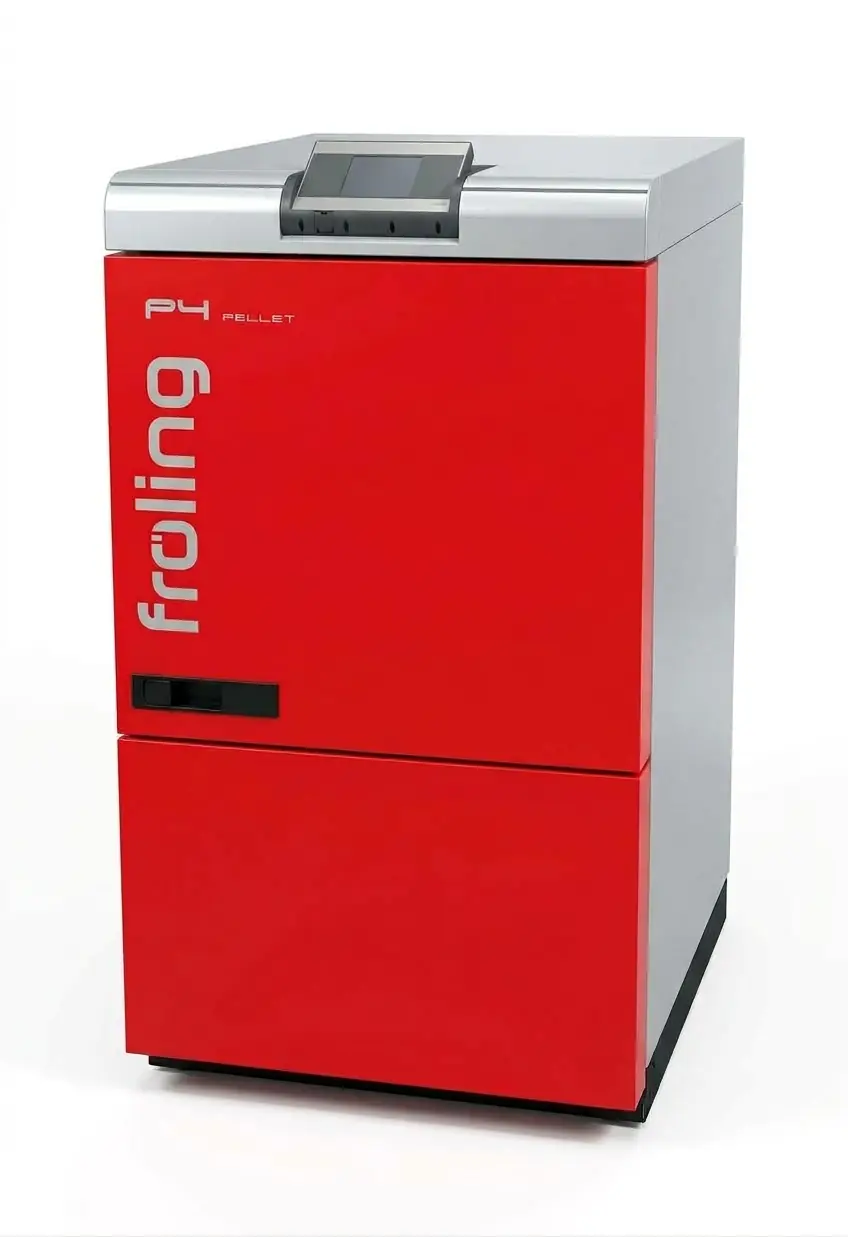
In the basement there's a Fröling P4 Pellet boiler with a Lambdatronic P 3200 controller. What it displays (boiler, buffer and outside temperature, pellet level, errors) I don't want to see only on the display in the basement. So a Raspberry Pi polls the values every five minutes over the serial service port.
The protocol isn't officially documented. This post covers how it is built and where the traps are.
COM1 or COM2?
The Lambdatronic has two serial ports:
| Port | What it does |
|---|---|
| COM2 | Sends the most important boiler values as text every second, on its own. Read-only, fixed set. |
| COM1 | Service port: request and response, binary. Can read everything the controller knows, and write. |
COM2 is the quicker start, COM1 the complete one. This post is about COM1.
First: this is a report, not a guide
From here on, this is what I did to my own boiler. I don't recommend that anyone copy it.
- There is mains voltage behind the cover. Work on electrical equipment is a job for a qualified electrician. If you aren't one, leave the cover on and ask your heating installer or the manufacturer's service.
- Before opening, shut the boiler down at the controller and let it burn out. Only then cut the power at the heating emergency switch and make sure nobody switches it back on.
- Opening the boiler can cost you the warranty, your statutory rights and your insurance cover. The manufacturer's manual applies, not this post.
- If you open the boiler anyway, you do so at your own risk. I accept no liability for damage to the boiler, the system or people.
Where COM1 is
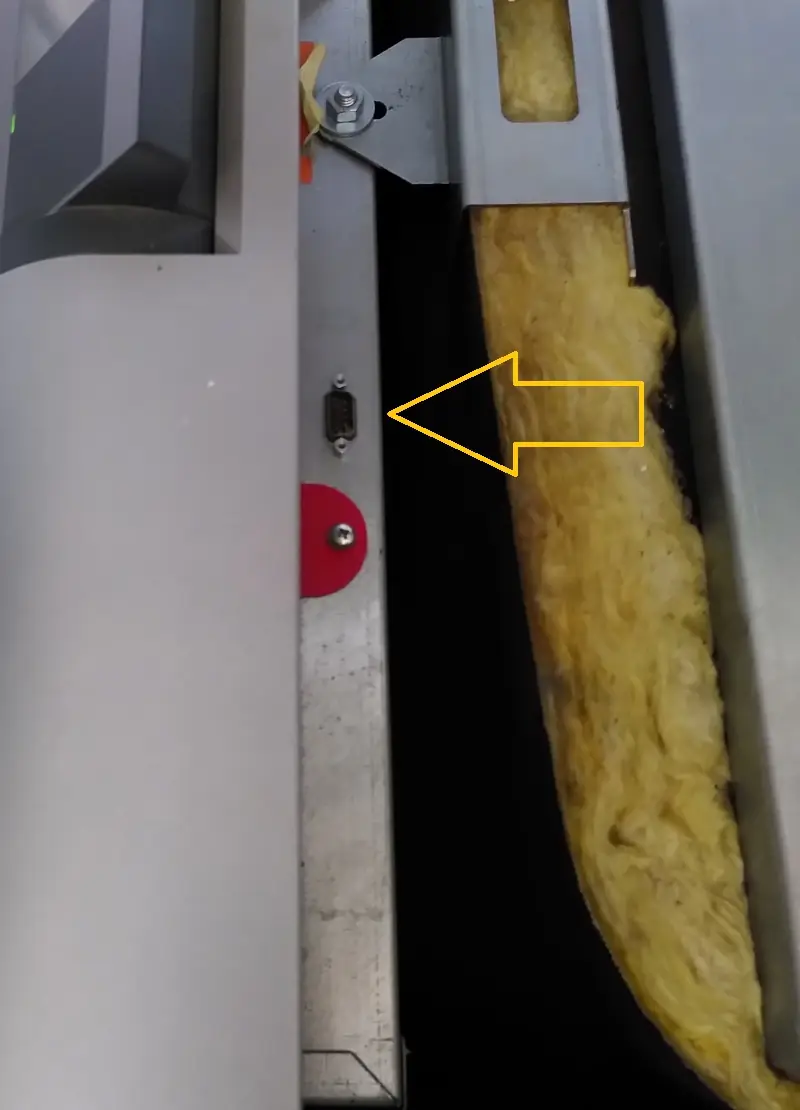
It may work without unscrewing anything. From above you can see a nine-pin connector in the side of the controller housing. Whether that is COM1, I don't know.
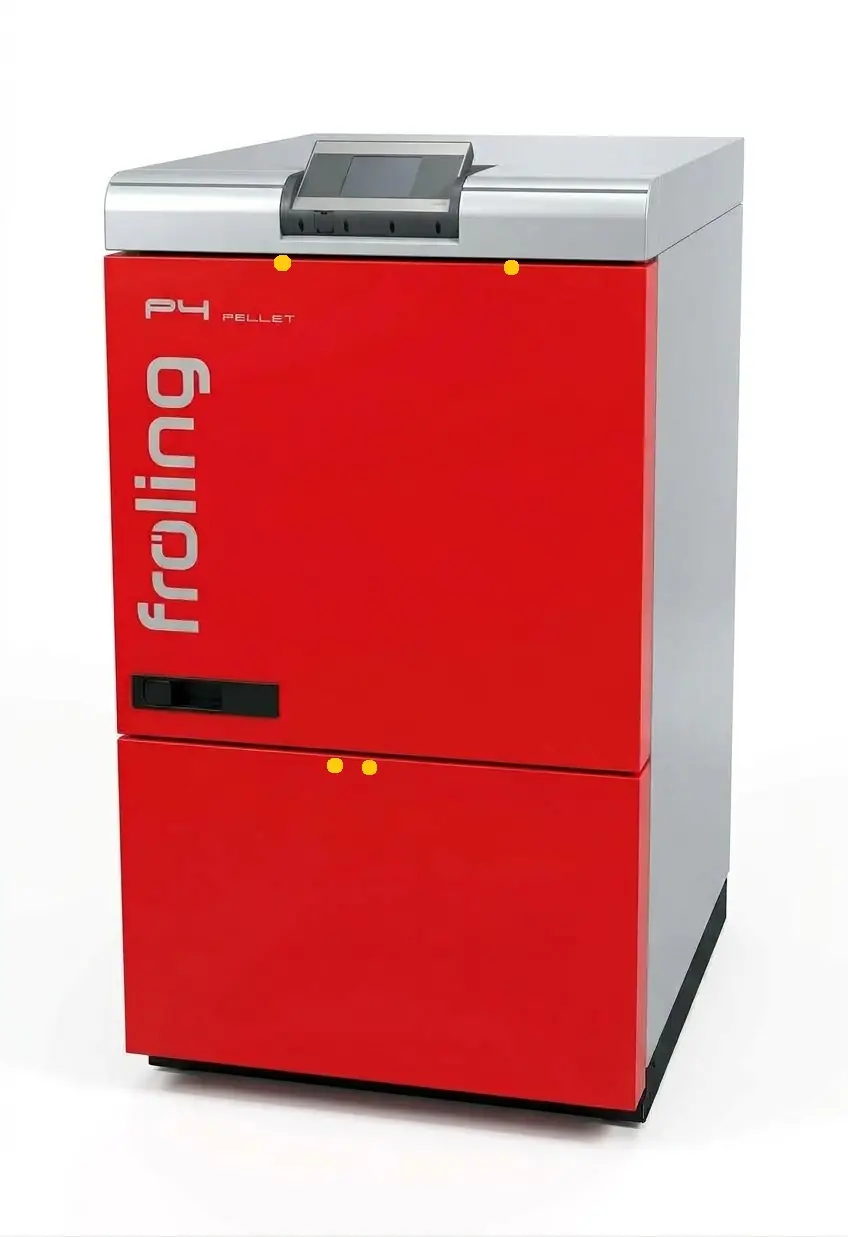
I unscrewed the front cover instead, at the four spots marked in yellow:
Behind it is the Lambdatronic board:
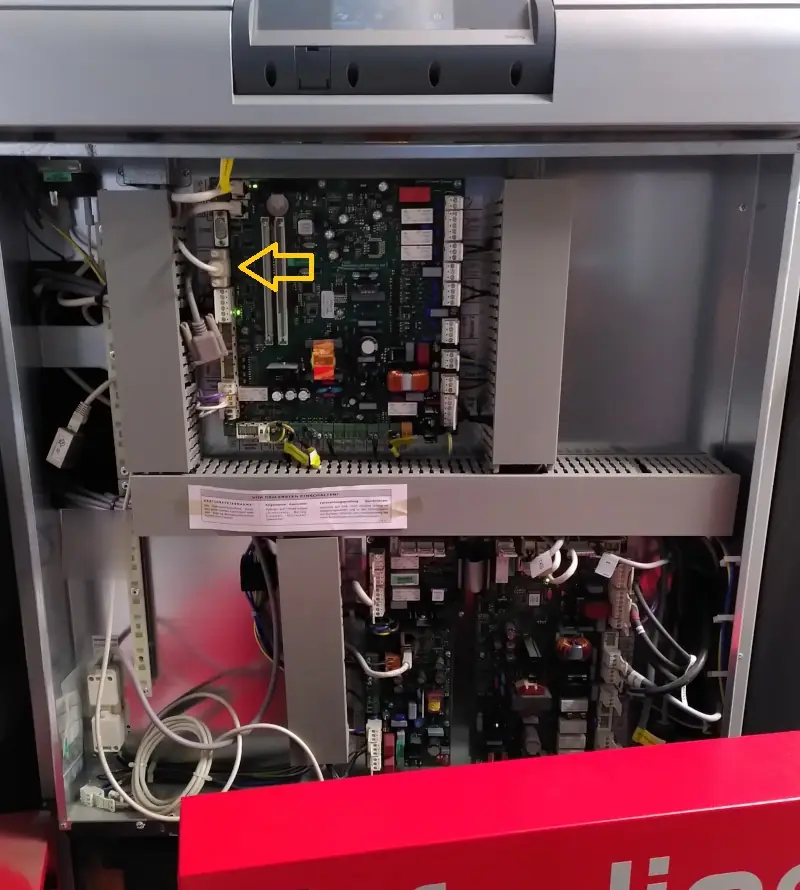
COM1 is on the left edge, right below COM2, and labelled "Service-Schnittstelle" (service port):
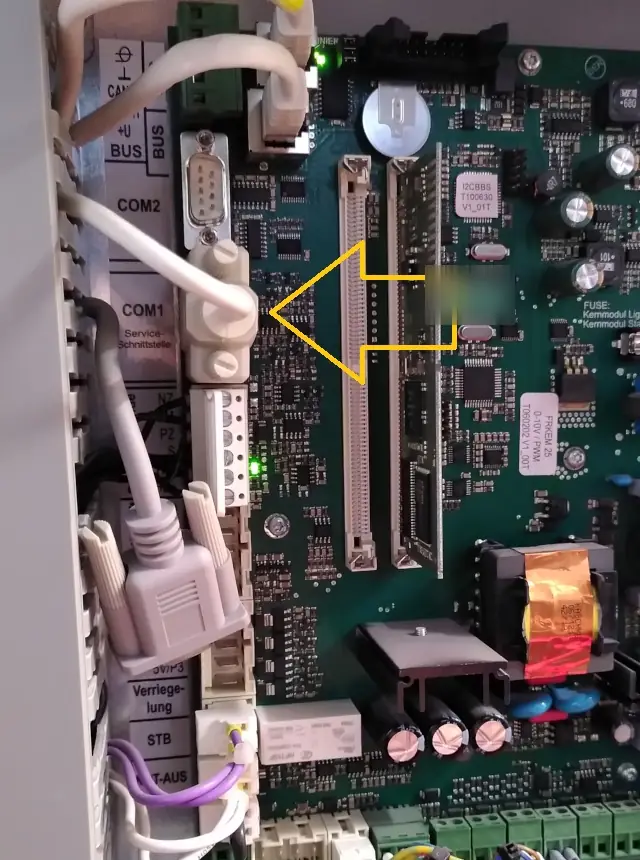
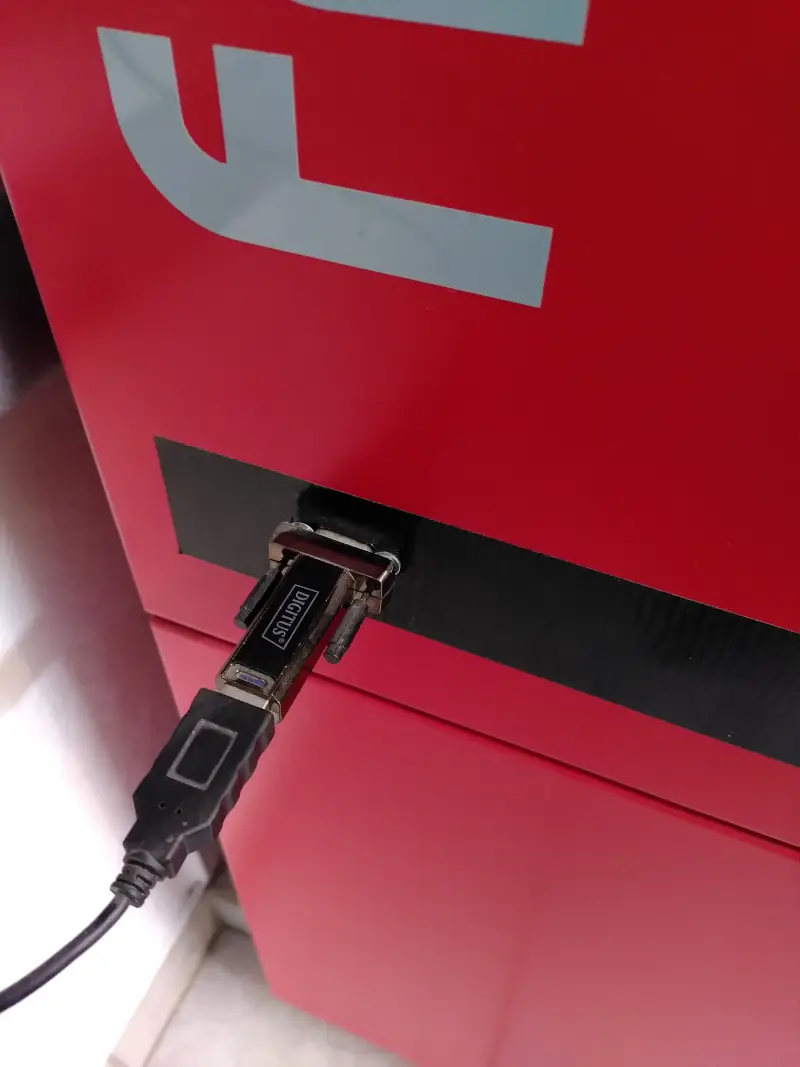
On my boiler an ordinary serial cable is plugged into COM1. That's all there is to it: nothing soldered, no pins tapped. I led the other end out into the cover. A USB-to-serial adapter is plugged in there, and from it a USB cable runs to the Raspberry Pi:
The hardware
- Cable: serial, nine-pin, crossed as a null modem: pin 2 to 3, 3 to 2, 5 to 5 (ground). No other wires needed.
- On the Raspberry: a USB-to-serial adapter. It shows up as
/dev/ttyUSB0. - Settings: 57600 baud, 8 data bits, no parity, 1 stop bit, no handshake.
The frame
Every message, in both directions, looks like this. Here's the request for the operating hours:
02 FD    00 03    30        00 62    F2
Start    Length   Command   Data     Checksum
02 FDstarts every frame.- Length counts data plus checksum, two bytes, high byte first.
- Command is one byte, and the response carries the same one.
- Checksum is one byte over everything before it,
02 FDincluded:
function checksum(bytes: ArrayLike<number>): number {
    let crc = 0;
    for (let i = 0; i < bytes.length; i++) {
        crc ^= bytes[i] ^ ((bytes[i] << 1) & 0xff);
    }
    return crc;
}
The response to the example is 02 FD 00 03 30 10 E2 42: 10E2 is 4322 hours.
Escaping
Five byte values must not go over the wire raw after 02 FD:
| Byte | is sent as |
|---|---|
02 |
02 00 |
2B |
2B 00 |
FE |
FE 00 |
11 |
FE 12 |
13 |
FE 14 |
11 and 13 are XON and XOFF, 02 would look like the start of a new frame. On
receive, the same is undone in reverse.
The first trap: length and checksum are computed before escaping and don't change
because of it. The board temperature (address 0002) goes out as
02 FD 00 03 30 00 02 00 52: nine bytes, and the length still says 00 03.
The length itself gets escaped too. The request for the value list has
length 2 and therefore looks like 02 FD 00 02 00 31 01 57. The 00 after the 02
belongs to the length, not to the data.
On receive, unescape byte by byte, not on a hex string. "002004" contains a 0200
that doesn't exist as bytes. The bytes are 00, 20 and 04.
const ESCAPE: Record<number, number[]> = {
    0x02: [0x02, 0x00],
    0x2b: [0x2b, 0x00],
    0xfe: [0xfe, 0x00],
    0x11: [0xfe, 0x12],
    0x13: [0xfe, 0x14],
};

const PING = 0x22;

function buildFrame(command: number, data: number[] = []): Uint8Array {
    const withCrc = command !== PING; // the ping carries no checksum
    const length = data.length + (withCrc ? 1 : 0);
    const frame = [0x02, 0xfd, length >> 8, length & 0xff, command, ...data];
    if (withCrc) frame.push(checksum(frame));

    const out = [0x02, 0xfd];
    for (const byte of frame.slice(2)) out.push(...(ESCAPE[byte] ?? [byte]));

    return Uint8Array.from(out);
}

function unescapeFrame(raw: ArrayLike<number>): number[] {
    const out = [raw[0], raw[1]];
    for (let i = 2; i < raw.length; i++) {
        const [byte, next] = [raw[i], raw[i + 1]];
        if (byte === 0xfe && next === 0x12) {
            out.push(0x11);
            i++;
        } else if (byte === 0xfe && next === 0x14) {
            out.push(0x13);
            i++;
        } else if ([0x02, 0x2b, 0xfe].includes(byte) && next === 0x00) {
            out.push(byte);
            i++;
        } else out.push(byte);
    }
    return out;
}

// null as long as the frame hasn't fully arrived
function parseFrame(
    raw: ArrayLike<number>,
): { command: number; data: number[] } | null {
    const bytes = unescapeFrame(raw);
    if (bytes.length < 5 || bytes[0] !== 0x02 || bytes[1] !== 0xfd) return null;

    const length = (bytes[2] << 8) | bytes[3];
    if (bytes.length < 5 + length) return null;

    const command = bytes[4];
    if (command === PING) return { command, data: bytes.slice(5, 5 + length) };

    const end = 4 + length;
    if (checksum(bytes.slice(0, end)) !== bytes[end])
        throw new Error('Bad checksum');

    return { command, data: bytes.slice(5, end) };
}
The buffer is unescaped from the start again with every new chunk. Otherwise it breaks
when a 02 arrives at the end of one chunk and its 00 at the start of the next.
The commands I use
| Command | Data | Response |
|---|---|---|
22 |
any text | the same frame back, the connection test |
30 |
address (2 bytes) | the current value, 2 bytes |
31 |
01 |
first entry of the value list |
32 |
01 |
next entry, until the list is through |
41 |
none | software version, time, date |
47 |
none | first entry in the error buffer |
48 |
none | next entry; data 00 means: no more |
51 |
none | operating mode and state as text, e.g. Automatik;Heizen |
I send one request, wait for the answer, then send the next.
Watch out with the error buffer: the answer to 48 comes back with command 47. If you
check it against the command you sent, you throw away every error after the first.
Reading values: address, factor, sign
A value is a signed 16-bit number divided by a factor. Temperatures are in half degrees, so the factor is 2:
| Value | Address | Factor | Request |
|---|---|---|---|
| Boiler temperature | 0000 |
2 | 02 FD 00 03 30 00 00 54 |
| Outside temperature | 0004 |
2 | 02 FD 00 03 30 00 04 58 |
| Residual oxygen | 0003 |
10 | 02 FD 00 03 30 00 03 51 |
| Operating hours | 0062 |
1 | 02 FD 00 03 30 00 62 F2 |
| Pellet level in the hopper | 0071 |
207 | 02 FD 00 03 30 00 71 C7 |
The sign matters. At −3.5 °C outside, the controller sends FF F9. Read as unsigned,
that's 32,764.5 °C.
Ask your own controller for the addresses. The address lists floating around online
don't match the P4 everywhere. The one I had doesn't list the pellet level (0071) at all. Commands 31 and 32
return factor, unit, address and label for every value:
01   00 02    00 02   00 B0    00 00     4B 65 73 … 00
?    Factor   ?       Unit     Address   "Kesseltemperatur", null-terminated
The texts are encoded as Latin-1, by the way, not UTF-8. 52 FC 68 72 … is "Rührwerk"
(agitator), and read as UTF-8 you get a replacement character instead. The same goes for
error texts and the boiler state.
The error buffer
One entry from 47/48, after unescaping:
01 00   01       42     04      3A 1C 07      03 0C 0C       Kesseltemperaturfühler fehlerhaft
?       Number   Info   State   Sec Min Hr    Day Mon Year   Text
- State:
01raised,02acknowledged,04cleared. - Info is a bit field: bit 1 boiler, bit 2 feed system, bit 3 surroundings, bit 5 fault, bit 6 warning, bit 7 not yet acknowledged.
Putting it together in Node
With the serialport package and the functions above:
import { SerialPort } from 'serialport';

const port = new SerialPort({
    path: '/dev/ttyUSB0',
    baudRate: 57600,
    dataBits: 8,
    parity: 'none',
    stopBits: 1,
});

function request(
    frame: Uint8Array,
    timeoutMs = 3000,
): Promise<{ command: number; data: number[] }> {
    return new Promise((resolve, reject) => {
        let buffer = Buffer.alloc(0);

        const done = (
            error: Error | null,
            answer?: { command: number; data: number[] },
        ) => {
            clearTimeout(timer);
            port.off('data', onData);
            error ? reject(error) : resolve(answer!);
        };
        const timer = setTimeout(() => done(new Error('No answer')), timeoutMs);

        function onData(chunk: Buffer) {
            buffer = Buffer.concat([buffer, chunk]);
            try {
                const answer = parseFrame(buffer);
                if (answer) done(null, answer);
            } catch (error) {
                done(error as Error);
            }
        }

        port.on('data', onData);
        port.write(frame);
    });
}

const answer = await request(buildFrame(0x30, [0x00, 0x04]));
console.log(Buffer.from(answer.data).readInt16BE(0) / 2, '°C outside');
The values in Discord
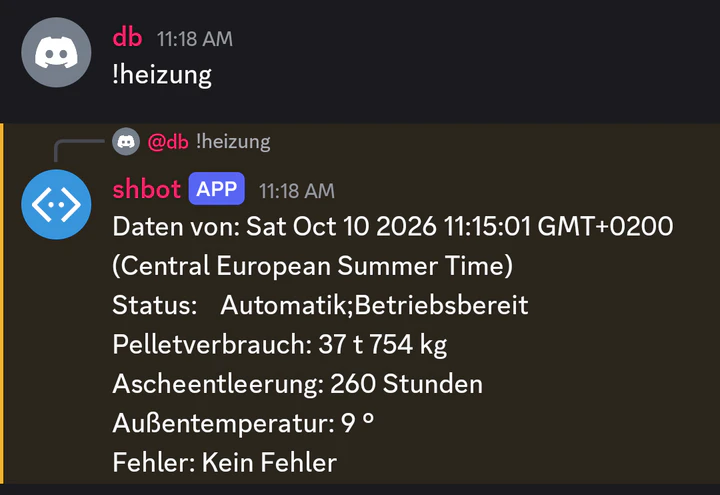
I have the values in Discord. A small bot answers !heizung (German for heating) with what
the Raspberry Pi fetched last: status, pellet consumption, ash removal, outside temperature
and errors. That way I can see from anywhere whether the heating is running.
And writing?
COM1 can do that too: settings (39), time (54), heating schedules (50), and single
inputs and outputs through so-called forcing. None of that is covered here, on
purpose. I only read. A wrongly set output on a pellet boiler isn't something to try out
just to see what happens.
Conclusion
The protocol itself is manageable. Only a few details take real effort:
- compute length and checksum before escaping,
- escape the length too,
- unescape byte by byte, not on a hex string,
48is answered with47,- texts are Latin-1, values are signed.